Pioneer Valley Regions
Regions
Setting regions up on your repeater is becoming increasingly important as more and more messages are sent with a region scope. If a user sends a message with a scope of “ma” a repeater with the default configuration will not retransmit that message. By default, repeaters only retransmit unscoped messages. More info on the recommended New England Regions. You can configure regions on your repeater via the companion app repeater admin settings or command line.
Log into your repeater via the companion app and select one of the following:
- In the settings panel, select “Manage Regions”
- On the “Manage Regions” page, click the three dots menu and add each of the regions ct-rv, east, ma, northeast, and pv
- Make sure the wildcart (star) region is included
- Check that each region is listed as “flood allowed”
- Click the checkmark at the top of the Manage Regions page
The list should look like:
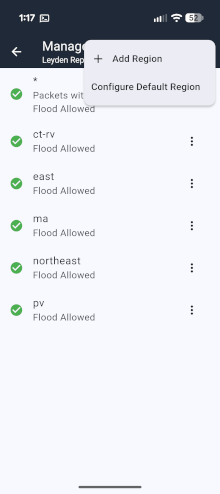
This will configure your repeater to retransmit flood messages as well as messages with a region set for our area. It will not retransmit messages that are intended to stay within another region. For example, if a user scopes a message with “ct” it will not be retransmitted by one of the Pioneer Valley repeaters since it was not intended to be received here.
Leaving the default settings in place on a repeater will deliberately drop messages that are intended to be delivered in our region.